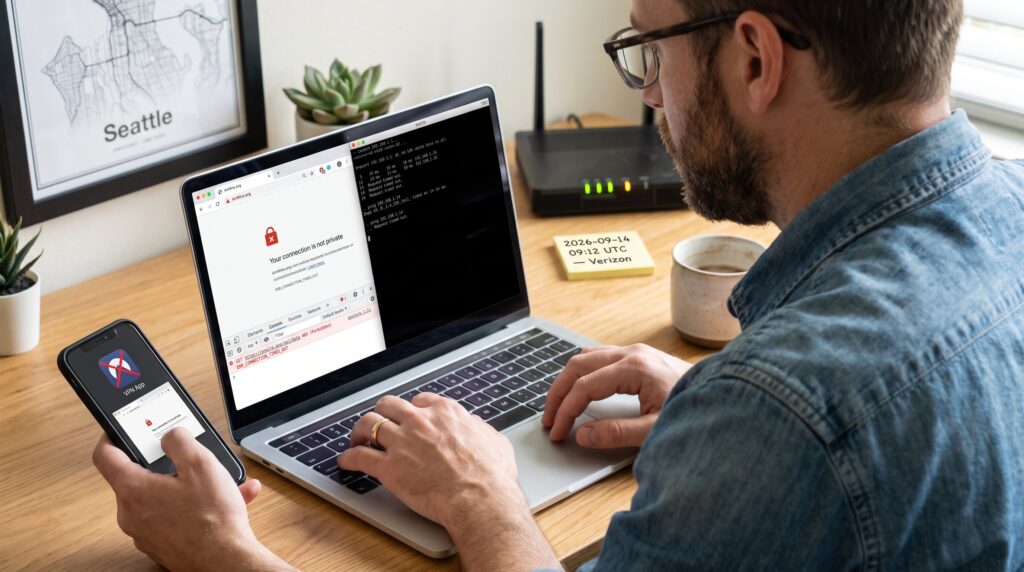
How to Troubleshoot Problems Accessing AnWire.org is a focused, practical set of steps readers can follow when the site won’t load. This guide gives clear checks to run in minutes, precise network commands to try, and exactly what to tell site operators if the problem persists. It suits someone who needs fast results, a parent trying to open a toddlers article, an editor uploading a story, or a reader blocked by a regional filter.
Key Takeaways
- Troubleshooting access to AnWire.org starts with identifying whether the issue is due to the browser, device, local network, DNS/ISP routing, or the site’s edge servers.
- Clearing browser cache and cookies or switching browsers can quickly resolve many access problems to AnWire.org in under five minutes.
- If multiple devices on the same network fail to load AnWire.org, restart the router, flush the DNS cache, and try alternate public DNS servers like Cloudflare or Google DNS.
- Running ping and traceroute commands helps detect if access issues stem from ISP routing or if the problem lies closer to AnWire.org’s servers.
- Confirm site-wide outages or geoblocking by testing AnWire.org from other networks, VPNs, or external uptime checkers before contacting support.
- When contacting AnWire for help, provide detailed troubleshooting steps taken, error messages, timestamps, ISP details, and traceroute outputs to expedite resolution.
Why You Might Be Unable To Access AnWire.org
Fact: Access problems usually come from one of five places: the browser, the device, local network, DNS/ISP routing, or the site’s edge servers. Start by narrowing which of those areas fails. For example, if a phone on mobile data can open AnWire.org but every device on home Wi‑Fi cannot, the router or ISP is the likely culprit. If one browser shows a certificate or mixed‑content error while another displays the site normally, the browser setup or an extension is at fault. They should expect specific errors: DNS failures (“DNS_PROBE_FINISHED_NXDOMAIN”), timeouts, HTTP 403/403.1 or 451 errors, or security‑certificate warnings.
A concrete scenario: a community reporter in Madrid could not reach the homepage at 09:12 CET while colleagues on VPN did: the trace showed regional routing dropped at the ISP edge. Another example: a parent cleared cookies and restored access in 90 seconds after an authentication cookie corrupted the session. These patterns map to precise fixes later in the guide.
Common root causes and quick indicators:
- Browser/cache: page loads with stale layout or login loops.
- Extension/security software: page blocked or stripped content.
- Router/ISP: all devices on one network fail.
- DNS or geoblocking: some regions or IP ranges can’t resolve the host.
- Site outage: uptime monitors and third‑party checks report global failures.
Use this section to pick the right next test from the checklist that follows.
Quick Local Fixes To Try First
Fact: Most access problems clear after a browser restart, clearing cache, or switching browser. Try these local fixes first because they take less than five minutes.
Clear Browser Cache And Cookies
Clear the cache and cookies and then reload AnWire.org. This removes stale files and corrupted login tokens that commonly break access. In Chrome: Settings > Privacy and security > Clear browsing data: select cached images/files and cookies. On Windows, a complete browser restart after clearing can prevent lingering processes from serving old content. A real example: a user cleared cached images and recovered a missing article list that had been replaced by a blank panel.
Test With Another Browser Or Device
Open the site in a different browser or an incognito/private window. If that works, an extension or setting is the issue. If another device on the same Wi‑Fi also fails, the problem is network‑level. To isolate further: try mobile data or tethering. If mobile data works and Wi‑Fi doesn’t, restart the router and continue with DNS checks below.
These simple steps solve roughly half of consumer access issues. If they don’t, move on to network and DNS debugging.
Network, DNS, And ISP Troubleshooting
Fact: When multiple devices fail, the issue often lives in the router, DNS cache, or ISP routing. Restart the router, flush local DNS, and test alternate DNS servers before assuming a wider outage.
First concrete actions (commands and numbers):
- Restart the router and wait 60 seconds for a full reboot. This often clears transient routing faults.
- Flush the DNS cache. On Windows run: ipconfig /flushdns. On macOS: sudo killall -HUP mDNSResponder. On many Linux systems: sudo systemd-resolve –flush-caches.
- Swap DNS to a public resolver: set primary to 1.1.1.1 and secondary to 1.0.0.1 (Cloudflare) or 8.8.8.8 and 8.8.4.4 (Google). These resolvers often bypass corrupted ISP DNS entries and return a working IP quickly.
Measure the difference: run ping anwire.org and tracert/traceroute to see where a packet drops. If the trace stops at the ISP’s network, call the ISP and report the hop IP and timestamp. If the trace reaches AnWire’s edge but HTTP still fails, the problem may be a firewall rule or rate limiting.
Practical warning: temporarily disabling antivirus/firewall rules for a single test is safe if done briefly and only when confident about the site. Always re-enable protections after the test.
Link: For basic browser support details when testing supported clients, the publisher uses industry standards similar to those in the supported browsers list.
Checking If The Site Is Down Or Geo-Blocked
Fact: If AnWire.org is unreachable from multiple networks or users in a region, the site may be down or intentionally filtered. Confirm with a second network, an uptime checker, or a VPN exit in another country.
Steps to confirm regional or global reachability:
- Try mobile data and a different Wi‑Fi. If both fail across several countries, the site likely has a broader outage.
- Use an external uptime check or ask a colleague in another city to test. If an external service reports a denial‑of‑service or outage, that points to server‑side issues.
- Use a VPN with an exit in a different country. If the site loads over a US or EU exit but not locally, a geo‑block or routing policy may be the cause.
Example incident: a news site experienced an apparent DDoS that made its API and homepage time out. Reported symptoms included sudden increases in HTTP 503 errors and a spike in connection latencies. That pattern signals a likely infrastructure problem rather than a local misconfiguration. When regional blocking is suspected, documenting the failure times and testing across at least two regions yields clear evidence.
Related reading on AnWire’s coverage of site technology helps explain how geographic delivery can affect users: consult a short technology overview in the site’s resource on site technology coverage.
When To Contact AnWire And What Information To Provide
Fact: Contact AnWire when local troubleshooting and network tests still show failure. Provide precise, actionable details so the team can reproduce and fix the problem quickly.
What to include in the support message (exact fields):
- Timestamp (with timezone) when the error occurred. Example: 2026-09-14 09:12 UTC.
- Your country and ISP name. Example: Spain, Movistar.
- Whether mobile data or a VPN worked.
- Exact error message and HTTP status (screenshot recommended). Example: “ERR_CONNECTION_TIMED_OUT” or HTTP 403.
- Steps already tried: cleared cache, flushed DNS, tried alternate DNS servers, tested another browser, restarted router.
- Results of traceroute/tracert and ping tests (copy/paste the output). Example: traceroute shows stop at 10.200.34.1.
Honest note: it’s fine to state what you don’t know, technicians prefer full context over guesses. If you disabled security software for tests, say so. If you saw a regionally specific message (e.g., “Access restricted in your region”), include the exact wording.
When a user contacts support, AnWire’s team can check firewall rules, IP blocks, and edge‑server logs. If the site needs additional diagnostic logs, AnWire will request them: having the above data ready speeds resolution.
Link: If readers want quick navigation help before contacting support, the site’s how‑to access guide explains common entry steps on AnWire and may answer simple navigation questions: see the short access guide.
When To Contact AnWire And What Information To Provide
Closing insight: persistent access problems are solvable when users collect the right signals and share them. Start local (cache, browser), move to network and DNS checks, then document results and escalate with timestamps, ISP, traceroutes, and screenshots. Being precise reduces resolution time from days to hours and restores access for readers who rely on AnWire.org for community, science, and health coverage.
For practical reading on what’s published at AnWire and how the site structures technology coverage, see the short site overview.