Remote access tools have become part of everyday work. They let people reach an office computer from home, support a device across the country, or keep a business running from anywhere.
That convenience has a cost. The same doors that let you in can let an attacker in too, and criminals know exactly where to look.
The good news is that most attacks rely on simple, avoidable mistakes. A handful of steps closes the gaps that intruders count on.
This guide walks through how to lock things down, in plain language, before a small oversight turns into a serious breach.
Why Remote Access Is Such a Big Target
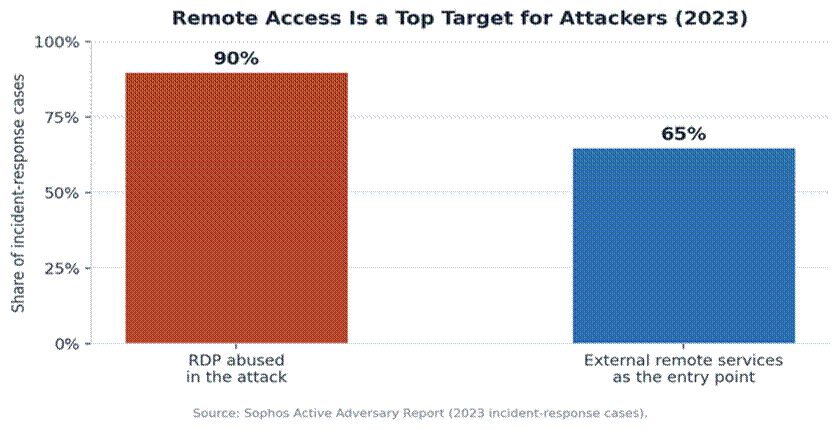
Attackers follow the path of least resistance, and exposed remote connections are often the easiest way in. Industry incident data makes that painfully clear.
In its review of real-world cases, one major security firm found that remote desktop protocol was abused in the large majority of attacks it investigated, and that external remote services were the single most common entry point.
The reason is simple. A remote connection that faces the open internet is reachable by anyone, anywhere, at any hour. Automated tools scan for these endpoints around the clock.
This is also why emerging online security trends keep pointing to remote access as a priority area for defenders heading into the year ahead.
Attackers also know that one weak remote connection can unlock an entire network. Once inside, they can move sideways, reach shared files, and stay hidden for weeks before anyone notices.
How a Breach Usually Unfolds
It helps to see how a typical break-in plays out, because the pattern is remarkably consistent.
First, automated tools scan the internet and find a remote connection left open to the public. No one targeted you specifically; you were simply visible.
Next, the attacker tries common passwords or ones leaked in past breaches. If there is no second layer of login, a single correct guess is all it takes.
Once in, they look around quietly, expand their access, and only then cause damage, whether that means stealing data or locking systems for ransom. Each of these stages is preventable with a few basic controls.
How Attackers Actually Get In
Most break-ins are not clever. They lean on weak passwords, stolen logins, and unpatched software rather than exotic tricks.
Breach research backs this up. The majority of incidents trace back to the human element, with stolen or guessed credentials a leading cause.
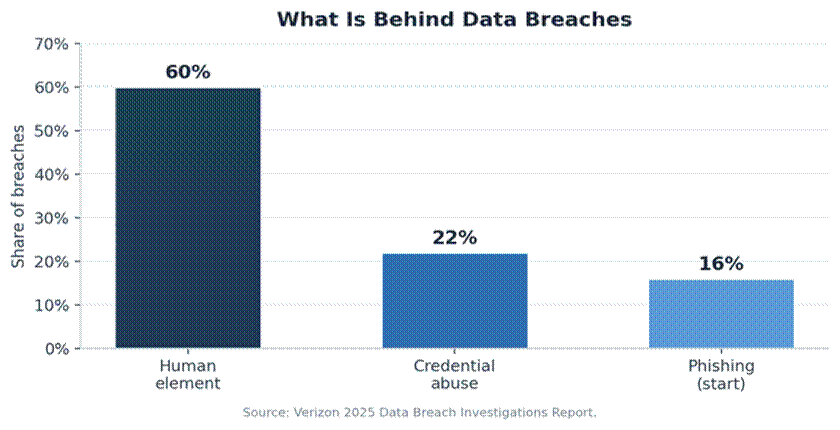
Two patterns stand out. Brute-force attacks hammer login screens with endless password guesses, and stolen credentials let attackers simply log in as you. Understanding how brute-force attacks work is the first step in shutting them down.
Old, unpatched flaws add to the risk. A well-known remote desktop vulnerability from a few years ago was so severe it could spread on its own, and unpatched systems remain exposed to this day.
Securing Your Setup, Step by Step
You do not need a security team to close the main gaps. The work of securing remote desktop software from hackers comes down to a short list of high-impact habits that anyone can follow.
The checklist below covers the essentials, along with what each step actually prevents.
|
Action |
What it stops |
|
Avoid exposing access to the open internet |
Blocks the constant automated scans for open ports |
|
Require multi-factor authentication |
Stops logins even when a password is stolen |
|
Use strong, unique passwords |
Defeats guessing and password-reuse attacks |
|
Turn on account lockouts |
Shuts down brute-force guessing attempts |
|
Limit who has remote access |
Shrinks the number of accounts an attacker can target |
|
Patch and update promptly |
Closes known holes before they are exploited |
|
Use a tool with strong encryption |
Keeps the session private from eavesdroppers |
|
Monitor and review login logs |
Catches suspicious attempts early |
If you do only one thing, enable multi-factor authentication. It is the single most effective barrier against stolen passwords, which sit behind so many break-ins.
Keeping remote access off the open internet is a close second. Reaching it through a private, controlled channel removes it from the view of opportunistic scanners.
None of these steps require deep technical skill. Most are settings you toggle once, and together they remove the easy wins that attackers depend on.
Build the Habit, Not Just the Setup
Security is not a one-time switch. The strongest setup drifts over time as people join, leave, and change roles.
Review access regularly and remove accounts that are no longer needed. Every unused login is a door left unlocked.
Apply updates as they arrive, on both the host and the devices that connect to it. Patches are only useful once installed.
It also helps to keep a simple record of who has access and why. A short review every few months catches forgotten accounts before an attacker does.
The same care applies beyond the desktop. Good habits like securing your other devices keep the phones and tablets that connect to your systems from becoming the weak link.
Who Needs to Act Now
This is not only an enterprise problem. Anyone who uses remote access has something worth protecting.
Home users often leave a personal computer reachable for convenience, without realizing it is visible to the whole internet. A few settings make it far safer.
Small businesses are squarely in the crosshairs, since attackers know they often lack a dedicated security team. The basics matter most here.
IT teams and managed providers carry the highest stakes, because one weak remote entry point can expose every client and system they support.
Why This Matters More Every Year
Remote work is not a passing phase. It has settled into normal operations for businesses of every size, which keeps remote access squarely in attackers’ sights.
As the shift to remote work continues, more devices connect from more places, and each one widens the surface that needs protecting.
For deeper, official advice, guidance from national cyber agencies lays out how organizations can detect and defend against the abuse of remote access tools.
The cost of getting this wrong keeps climbing, while the cost of getting it right is mostly a little time and discipline.
Frequently Asked Questions
What is the single most important step?
Turn on multi-factor authentication. It blocks the large share of attacks that rely on stolen or guessed passwords, even when the password is correct.
Is it safe to leave remote access on all the time?
It can be, if it is not exposed to the open internet, sits behind multi-factor login, and is kept patched. Otherwise, it is a standing risk.
Do small businesses really need to worry about this?
Yes. Automated attacks do not care about size. They scan every reachable system, so small setups are targeted just like large ones.
How do I know if someone has tried to break in?
Review your login logs for repeated failed attempts or logins at odd hours. A sudden spike in failures is a classic brute-force warning sign.
Are strong passwords enough on their own?
No. Strong passwords help, but they can still be stolen or phished. Pair them with multi-factor authentication and limited access for real protection.
Does better security cost a lot?
Usually not. Most of the highest-impact steps, like multi-factor login and limiting access, are built into the tools you already use and cost only a little time to set up.
The Bottom Line
Remote access is too useful to give up and too exposed to ignore. The threat is real, but it is also highly preventable.
Start with the basics: hide it from the open internet, require multi-factor login, use strong passwords, and keep everything patched. Those steps alone stop the bulk of attacks.
Set it up carefully now, build the habit of reviewing it, and you turn a favorite target for hackers into one of the hardest doors to open. The effort is small, and the protection it buys is well worth it.
References
1. Sophos. “Cybercriminals Abuse Remote Desktop Protocol (RDP) in 90% of Attacks Handled by Sophos Incident Response in 2023” (Sophos Active Adversary Report), 2024. https://www.sophos.com/en-us/press/press-releases/2024/04/cybercriminals-abuse-remote-desktop-protocol-rdp-90-attacks-handled
2. Verizon. “2025 Data Breach Investigations Report (DBIR),” 2025. https://www.verizon.com/business/resources/reports/dbir/
3. Cybersecurity and Infrastructure Security Agency (CISA), NSA, FBI, MS-ISAC, and INCD. “Guide to Securing Remote Access Software,” 2023. https://www.cisa.gov/news-events/news/joint-guide-securing-remote-access-software-released-cisa-and-partners
4. “What Is a Brute Force Attack? Definition, Types and How It Works,” CyberGlossary reference. https://www.fortinet.com/resources/cyberglossary/brute-force-attack
5. National Vulnerability Database. “CVE-2019-0708 (BlueKeep), Remote Desktop Services Remote Code Execution Vulnerability,” 2019. https://nvd.nist.gov/vuln/detail/CVE-2019-0708